We always see many types of software which give you detail about your computer like about Ram,hardsk,processor and another thing about your pc. but we do not need to really check all this information about our pc we can get this much of information using command promote(CMD).here is the trick how to see your computer detail using CMD
1. Start -> Run -> And type there cmd. command promote will open.
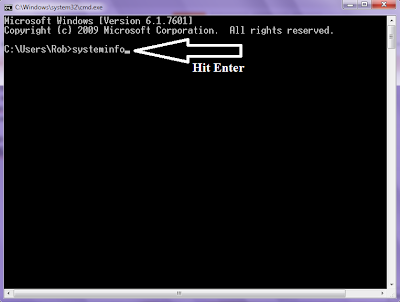
2. Type systeminfo (see the bellow photo)
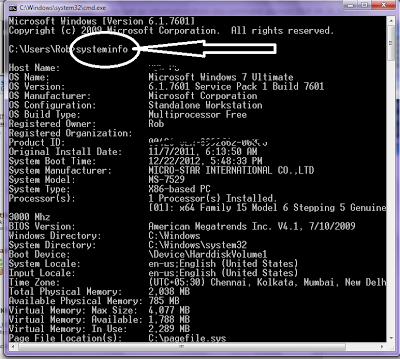
3.Now you can see your computer full configuration in detail here is a example photo of this.
Note: If you error message, may you are not activated DCOM Server Process Launcher service. To activate this service open Services window from "Start | Control Panel | Administrative Tools | Services" then start "DCOM Server Process Launcher" service.
1. Start -> Run -> And type there cmd. command promote will open.
2. Type systeminfo (see the bellow photo)

3.Now you can see your computer full configuration in detail here is a example photo of this.

Note: If you error message, may you are not activated DCOM Server Process Launcher service. To activate this service open Services window from "Start | Control Panel | Administrative Tools | Services" then start "DCOM Server Process Launcher" service.


